Veson Platform Client Resource Center
The Veson Platform brings IMOS, CoCaptain AI, Connect, Mail, and Insights together in a single experience. The data and workflows teams rely on today, now enhanced by AI, collaboration, and intelligence tools.
Keep scrolling to explore the new experience and learn how to make it part of your daily work.
Exclusive IMOS Client Webinar
Introducing the Veson Platform: IMOS + CoCaptain + Connect + Insights

Christine Sullivan, Simon Rowse, and Josh Luby
July 8th | 9:00am EDT / 2:00pm BST
- Platform capabilities
- See a demo
- Get started
- Explore FAQs
Veson Platform Overview
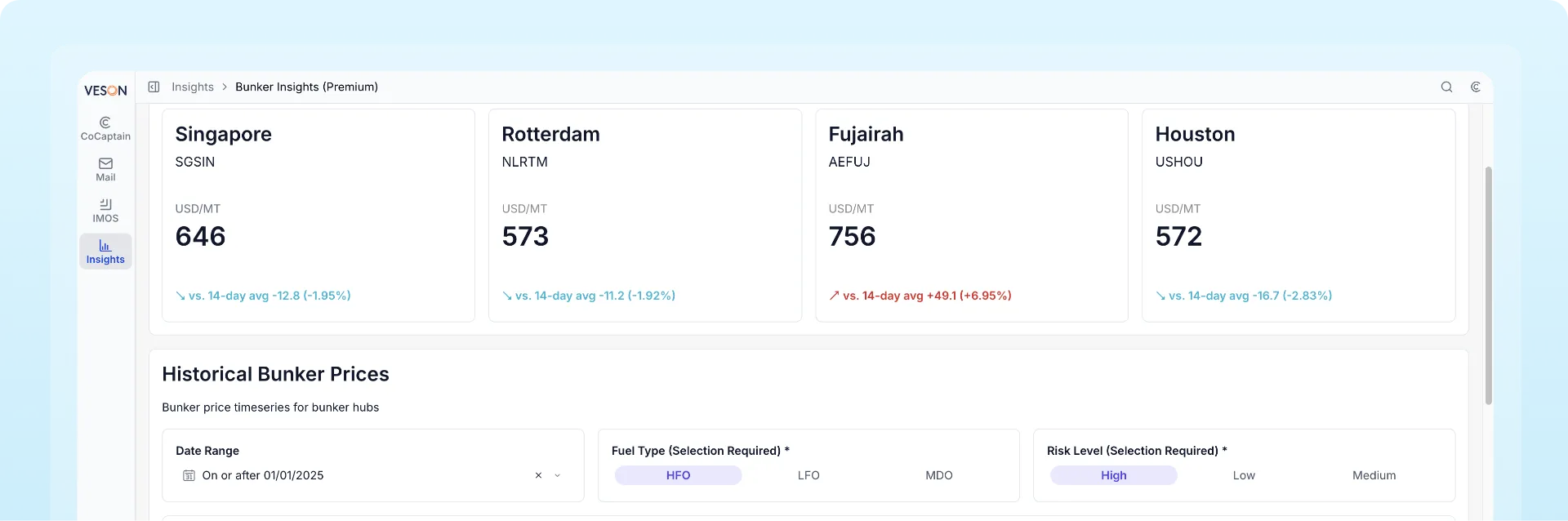
IMOS
We’ve brought the entire IMOS experience into the Veson Platform — the same workflows, data, configurations, and login you use today. The UI includes design enhancements and improvements, but the data and layout you’re accustomed to remains the same:
IMOS and IMOS X also remain accessible the same way you’ve always used them.

Your security permissions, lists, and views carry over automatically with no reconfiguration required.
Bringing IMOS into the Veson Platform unifies IMOS and IMOS X into a single place. You no longer need to move between two separate applications.
For certain objects — cargoes, voyages, claims, and port calls — the “Enhanced View” switches you to the IMOS X view of that object.
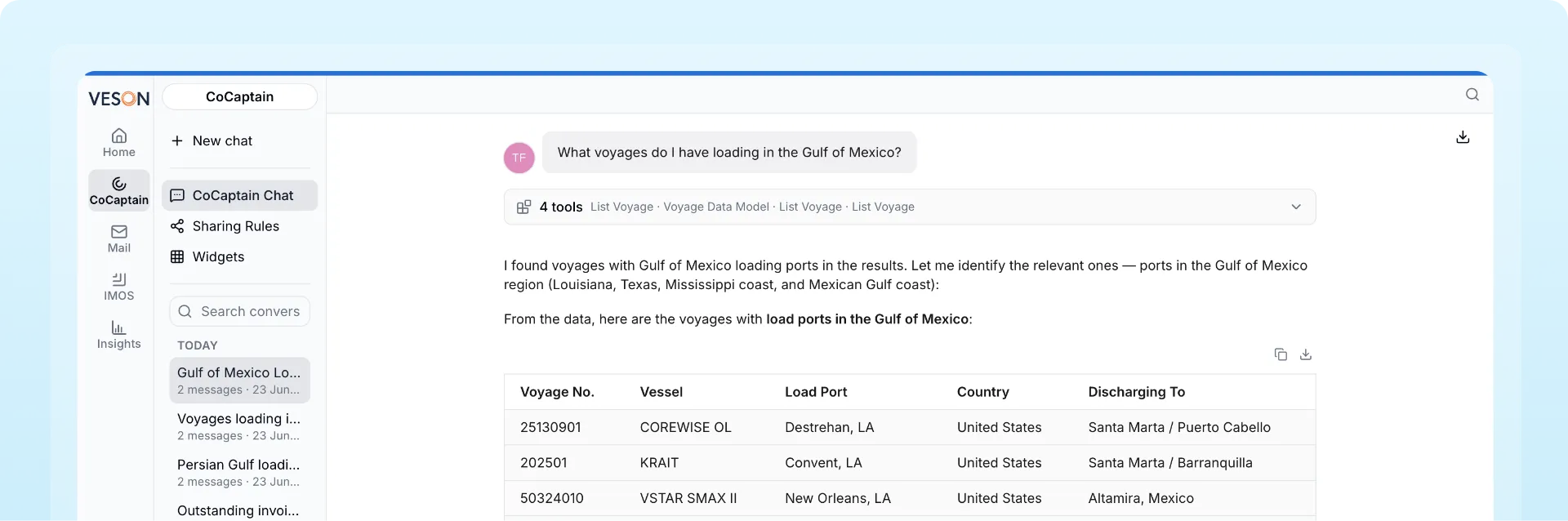
CoCaptain
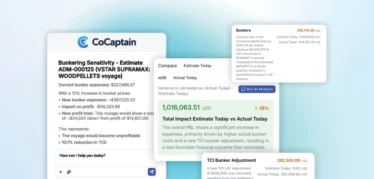
CoCaptain is Veson’s contextual AI, now accessible across the Veson Platform. Access it from the dedicated CoCaptain menu or from any screen within IMOS, where it will have greater context of the object and record you’re working on.
Core CoCaptain is included for all IMOS users.
Ask questions about the voyage, cargo, or claim you’re viewing and get answers grounded in that record
Flag missing data on an estimate and let CoCaptain fill what it can
Kick off a related task — like a bunker requirement for an upcoming port call — without leaving the screen you’re editing
Jump to any list or record by asking in plain language, or search across the platform from anywhere with Cmd+K (Mac) / Ctrl+K (Windows)
Click any record CoCaptain references in a reply to go straight to it
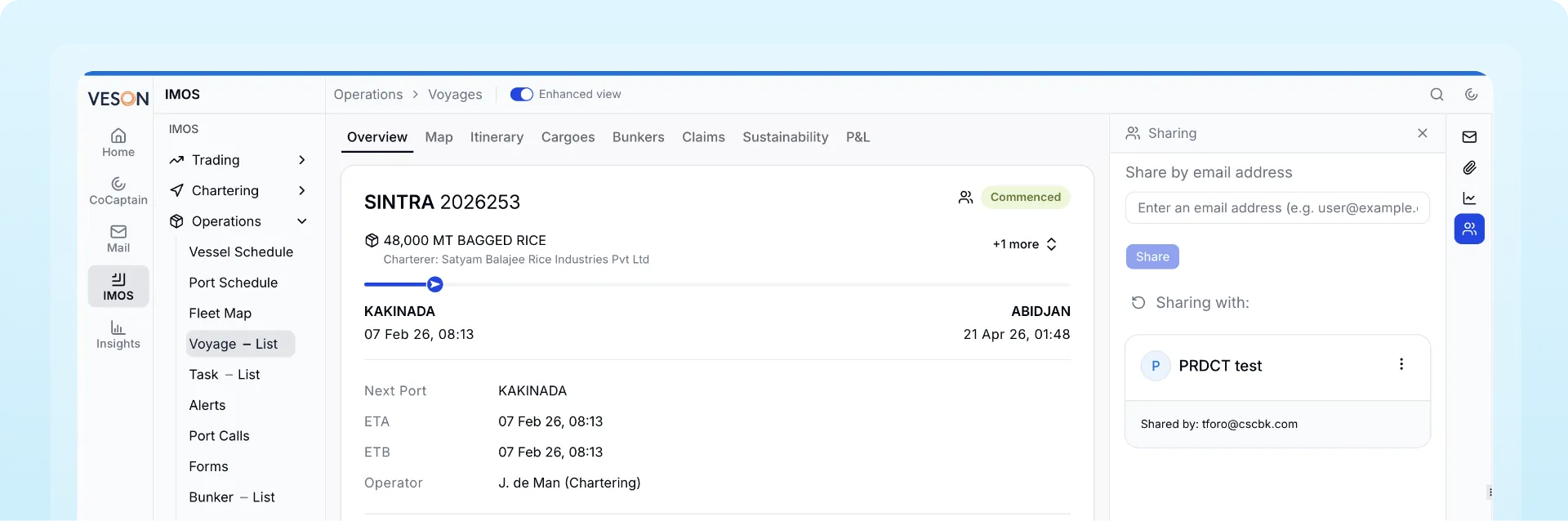
Connect
Connect is where communication and collaboration come together in the Veson Platform. Today, this is primarily the sharing functionality that was previously available in IMOS X. Sending and receiving updates is free within the Veson Platform, but the functionality needs to be enabled before you can start. To turn it on, contact your account manager.
Connect will continue to grow as the place where maritime communication and collaboration live in the platform.
For clients who’ve enabled sharing, To access it, navigate to the Enhanced View in IMOS on objects such as voyages, cargoes, and port calls.
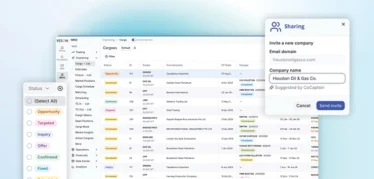
Inside the Enhanced View, the Sharing column shows the voyages, cargoes, and port calls that counterparties have shared with you.
To share updates, open the sharing panel, and then you can share cargo, voyage, and port-call updates with your counterparties.
You can share with counterparties who don’t have IMOS, and they’ll access those updates from within the Veson Platform. If they haven’t signed up yet, they’ll receive an invitation to sign up when you begin sharing with them.
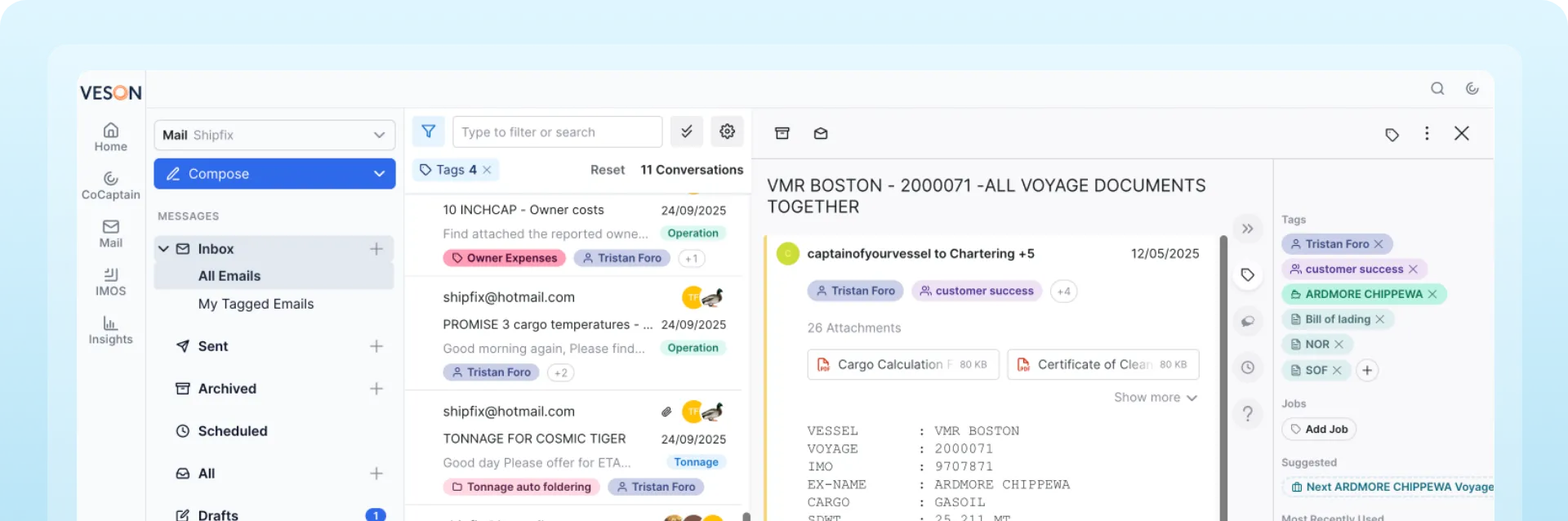
We believe maritime email should be available to everyone — that’s why we’ve brought Mail directly into the Veson Platform. Mail is Shipfix Mail — streamlined and embedded in the Veson Platform, now available to all users.
Mail is included with the Veson Platform — unlimited users, no per-user licensing, and free storage for your first 1 million emails. For pricing beyond 1 million emails, contact your account manager.
If you have Shipfix Mail today: Mail is available through single sign-on with your existing credentials.
Not all of Shipfix Mail functionality is available in the platform yet. — we’re actively working to bring it all over. In the meantime, Shipfix Mail, Shipfix Market Screens (Chartering and Trading), and Shipfix Insights all remain accessible where you access them today.
Insights
Veson Insights is a suite of data products that bring maritime datasets together, enriches them through Veson’s Data Science team, and validates them for confident use across commercial, operational, and compliance work. It’s available natively in the Veson Platform, IMOS, Insights Dashboards, or via API.
Both products are available to IMOS clients. Every IMOS user has access to core data today; to expand coverage, contact your account manager.
Vessel Insights:
Your single source of truth for vessel data.
Combines and reconciles vessel data from multiple sources into one validated record per vessel.
Refreshed daily, so your teams stop reconciling conflicting specs from different vendors.
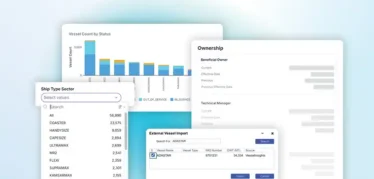
Search any vessel by IMO number from inside IMOS.
Pull validated data straight into the estimate or your vessel data base.
Bunker Insights:
An independent bunker price benchmark you can use to validate quotes, price voyages, and plan for fuel-cost exposure.
Delivers daily price predictions across 1,300+ ports, historical pricing, and forward price scenarios.
Historical pricing for 20 bunkering hubs from 2018 to present
The Veson Platform is waiting.
Explore the Veson Platform
Start your Veson Platform journey today
Here are a few ways to get familiar with the Veson Platform.

Request access
Request access to the Veson Platform and our team will help you get set up.
Browse
Open a voyage, cargo, or claim and find your existing permissions, lists, and views already in place.
Log in
Log in to the Veson Platform using your existing IMOS credentials — no new account or setup.
Ask a question
Open CoCaptain from any IMOS screen and ask a question about the record you’re on.
Enhance your view
Switch on the Enhanced View toggle within a cargo, voyage, claim, or port call to see the new view of that object.
Explore insights
Explore your vessel data through Vessel Insights.
More on the Veson Platform
Frequently Asked Questions
Yes, your IMOS credentials will log you into everything in the platform.
No, for now the Veson Platform is not available on mobile devices. IMOS X access is not going away and therefore can still be used for mobile access as needed.
No, accessing the Veson Platform is free for all IMOS clients.
There are many different options for getting help and support depending on your question:
– Reach out to your account manager
– Visit the Veson Help Center
– Submit a support ticket
All IMOS clients will have access by July 31. If your organization would like access sooner, please request access using the link above
Your system admin will be responsible for enabling access for individual users. Users in your environment will not automatically receive access unless your system admin grants it.
No. Your data, workflows, and configurations are available as-is in the Veson Platform. There is no migration or reconfiguration.
Yes. Your existing security permissions, lists, and views are already in place when you log in.
No. The data and layout you’re used to are exactly the same. The UI includes some design improvements, but your workflows don’t change.
Yes, everything in IMOS today will also be available in the Veson Platform.
Yes, they will continue to run as the location of IMOS and the messaging service does not change.
Yes, all integrations and API connections should continue to work in the Veson Platform.
Anything unsaved in IMOS will not appear in the Veson Platform.
Please submit a support ticket or contact your account manager
IMOS X is being unified with IMOS in the Veson Platform. The views you are accustomed to seeing in IMOS X are available on their respective objects such as cargoes, voyages, claims, and port calls by clicking the “Enhanced View” toggle.
It’s a new view of IMOS objects such as cargoes, voyages, claims, and port calls with more visual elements, additional filters, and adjustable column views.
Yes. Both remain accessible where you access them today.
Veson’s contextual AI, embedded across the Veson Platform. It can answer questions and take actions grounded in what you’re working on.
Core CoCaptain functionality is included for all users inside the Veson Platform.
In the dedicated CoCaptain tab, or on any screen within IMOS, where it’s aware of the screen you’re viewing.
Yes. When you open it on a record, it has context and answers grounded in that record.
Yes. You can have it handle a related task — like starting a bunker requirement for an upcoming port call — while you keep working on your current screen.
At this time, CoCaptain just works with IMOS.
Yes. CoCaptain can also create, update, and delete records.
No. CoCaptain will not prompt for confirmation of the change, but it will ask for permission to make a change and when making a change within an object in context, in most instances saving will still be required for the change to take place.
There is no explicit ‘undo’ option, but you can prompt CoCaptain to undo a change or navigate away from an object without saving changes made by CoCaptain which will undo any of the changes that were made and not already
No. CoCaptain respects existing permissions — it can only work with what you can already access.
Yes. Please reference the documentation in the Veson Help Center for more information about what CoCaptain is capable of and where it is intentionally restricted.
No. CoCaptain is trained on data sources proprietary to Veson, including IMOS business logic, the knowledge base, and decades’ worth of maritime expertise. It is not trained on any individual client’s data.
Yes. A user will be able to see, access, and search through historical chats that they have had with CoCaptain.
CoCaptain has no fixed list of officially supported languages and can communicate in most major languages. Keep in mind that the Veson Platform interface itself — menus, field labels, and the like — is in English, so references to specific field or module names will usually appear in English no matter which language you use. How does Shipfix’s vessel email solution enhance collaboration within an organization?
Connect is not a tab or capability in the traditional sense. It’s how we think about collaboration and communication within the Veson Platform. What falls underneath the Connect brand is functionality for sharing updates with counterparties, Mail, and additional communication tools in the future.
Go to the Enhanced View in IMOS on a voyage, cargo, or port call. Once in this view, navigate to the sharing panel. From there you can share these cargoes, voyages, or port calls with your counterparties or view updates shared with you.
Sending and receiving updates with counterparties is free within the Veson Platform.
The feature needs to be enabled first. Please contact your Veson Account Manager to help you get this functionality turned on. If this functionality is already enabled for your organization it may be due to your access permissions from your organization.
Your counterparty will only see the records — cargoes, voyages, port calls — that you decide to share with them.
Yes, you can stop sharing updates with any counterparty you’ve previously shared updates with.
Yes. They’ll access those updates from within the Veson Platform.
You can invite a counterparty to view the records you want to share with them. To do this, when you share a record, enter their email and click invite. The record will be shared, an organization will be created, and they’ll receive an invitation to sign up, after which they can immediately view the data you shared.
Your counterparty can also request access directly from Veson if they’d prefer. This can be done by requesting a demo on the Connect page.
No, counterparties can receive the updates you share with them for free.
When you begin sharing with any counterparty the recipients receive an email notification with a direct link to open the data in the Veson Platform. Afterwards, all updates will appear directly within the Veson Platform.
Maritime email built into the Veson Platform, built from Shipfix Mail and now available to all users.
It’s available through single sign-on with your existing credentials. Just open Mail in the platform.
Please reach out to your Account Manager or Client Success Manager to help you get started with Veson Mail.
Not yet. Not all Shipfix Mail functionality is available in the platform yet — we’re actively working to bring it all over.
Calendar, Directories, Jobs
Yes, this data will be available in both Mail and Shipfix Mail.
Yes. Shipfix Mail, Shipfix Market Screens (Chartering and Trading), and Shipfix Insights all remain accessible where you access them today.
Mail is included with the Veson Platform — unlimited users, no per-user licensing, and free storage for your first 1 million emails per organization. For pricing beyond that, please contact your Veson Account Manager.
Clients and their respective Veson Account Manager will be notified in advance before crossing email thresholds.
A suite of data products that brings maritime datasets together, enriches them through Veson data science, and validates them for use across commercial, operational, and compliance work. Two products are available today: Vessel Insights and Bunker Insights.
Your single source of truth for vessel data — multiple sources combined and reconciled into one validated record per vessel, refreshed daily.
Bunker Insights is an independent bunker pricing benchmark built with Veson’s proprietary data science modeling you can use to validate quotes, price voyages, and manage risk.
Search any vessel by IMO number from inside IMOS and pull validated data straight into the record.
Bunker Insights Core tier is included in for IMOS clients at no additional cost and can be accessed via Insights Dashboard in the Veson Platform. Additional data is available, contact your account manager for more information.
Vessel data is refreshed daily when new information is available.
Vessel Insights draws on three distinct types of vessel data from Shipfix, VesselsValue, and Q88 — each collected differently, each contributing something the others can’t.
You decide. You choose field-by-field what to adopt into your record.
Every IMOS user has access to core data today. To expand coverage, contact your account manager.
Yes, via the Insights API. Contact your Account Manager to learn more
Bunker Insights pricing estimates are ~95% accurate across all fuel types.
Full history back to 2018 for ~20 hub ports. Daily pricing for 1,300+ ports under Essential/Enhanced tiers. Scenario estimates for ~9,500 ports under Premium tier.
The pricing sits competitively relative to alternatives: below Argus/Platts for comparable spend, ahead of free market data by design, and justified by a ROI threshold. Pricing represents a fraction of typical bunker spend.